How it works
From a camera picture to data you can defend
The ideas behind a CV-Scope study, in the terms the application uses. Engineers can continue to the architecture; everyone else can stop here and start the first experiment.
The pipeline
- 1
Camera or video
A video file, USB webcam, or RTSP or HTTP stream.
- 2
Detection
A detector finds people, vehicles and other objects in each frame.
- 3
Tracking
Detections become anonymous tracks that restart with every run.
- 4
Your scene
Lines, gates, zones and routes turn movement into interactions.
- 5
Rules
Crossings, visits, dwell, routes and sequences are decided per track.
- 6
Events
One stored record per observation, with its track, time and rule.
- 7
Analysis
Summaries, video review, evaluation, exports and the API.
Worker process, one per running camera
-
Frame source
vision/sources/Files, USB cameras and RTSP or HTTP streams behind a FrameSource interface, with reconnection.
Knows nothing about detection.
-
Preprocessing
vision/preprocessing.pyRotation, crop, preview resizing and JPEG encoding for the browser.
-
Detector
vision/detectors/Ultralytics, ONNX Runtime or torchvision provider, chosen with the hardware probe and a recorded fallback chain (vision/inference/).
Knows nothing about lines, zones or routes.
-
Tracker
vision/trackers/ByteTrack or BoT-SORT: anonymous, session-scoped ids in tentative, tracked, lost and removed states.
-
Entity resolver Licensed
recognition/runtime.pyOnly with a licence: says whether a track is an enrolled person or a registered plate. The core sees an interface, never recognition code.
-
Spatial engine
spatial/engine.pyGeometry only: crossings with direction, zone presence and dwell, sampled ground points, calibrated distances.
Does not decide what an interaction means.
-
Rule engine
rules/engine.pyPer-track state machines for lines, zones, route groups, sequences and dwell rules. A track without complete evidence is never forced into a route.
-
Relationship engine Optional
relationships/engine.pyObservations, time-bounded relationships and correlated events, each with a confidence and its evidence.
Imports no detector, tracker or recognition model.
API process
-
Supervisor and storage
storage/writer.pyDrains the worker queues and writes events, track summaries and trajectories in batches to SQLite or PostgreSQL; restarts crashed live workers.
-
Cross-camera correlation Optional
crosscam/Joins identity sightings on different cameras into scored transitions, on a background thread.
-
Analytics and interfaces
analytics/Analytics only read stored rows. The REST API, WebSockets, webhooks and the cvscope command line sit on top.
Never re-runs detection to answer a question.
Paths are relative to backend/pathscope/ and link to the synced commit. A GPU or decoder crash stays inside its worker process; the API keeps running.
The building blocks
Six things you will meet on every page of the application, from the outside in.
- 1
Project
One study or one monitored place. It groups cameras and experiments.
- 2
Camera
A video file, USB camera or RTSP or HTTP stream, with its frame rate, rotation, crop and reconnection policy.
- 3
Scene
The lines, zones and routes drawn on that camera, stored relative to the frame. Versioned: a version a run has used is frozen.
- 4
Experiment
The question: scene version, object classes, detector, tracker, preset and rules, with research and condition notes.
- 5
Run
One execution of an experiment, with a snapshot of the detector, device and tracker it actually used.
- 6
Events and tracks
The research record: one row per event, one summary per anonymous track, and optionally the sampled trajectories.
What you draw, and what it records
The Scene Builder’s tools, with their keyboard keys. These colours are the canvas colours of the application and mean the same objects everywhere on this site.
-
Line L
Two clicks. Counts and records crossings, with a forward and a reverse direction.
-
Gate G
A line that can also start or end a route.
-
Zone Z
A polygon. Entries, exits, occupancy and dwell time.
-
Checkpoint C
A small polygon a route must pass through, in order.
-
Route R
Start gate, checkpoints, end gate. Every track that starts ends as one route, Unknown, Abandoned or Lost track.
-
Ignore area I
Detections inside are dropped before tracking: reflections, screens, unrelated traffic.
-
Calibration K
Reference points with real coordinates, or one known distance, so speeds and distances are in metres.
From a track to an event
A detector finds objects in each frame and a tracker gives them anonymous ids that last for the run. The spatial engine only understands geometry; the rule engine decides what an interaction means.
- The ground point. Each tracked object stands at the bottom centre of its box. That point, sampled about ten times a second, is what CV-Scope stores as the trajectory.
- A crossing is the ground point moving from one side of the line to the other. The line’s arrow is its forward direction; the other way is reverse.
- Guards against noise. The move counts only if the track was already a few frames old where it started, and a repeat crossing by the same track within the line’s debounce time is ignored.
Zones count a visit from the moment the ground point is inside. Exits shorter than the zone’s allowance keep a visit going, and corners drawn close to the frame edge count as on it, because a person cut off by the frame stands on its bottom edge.
Routes that share a start gate form one study. Every track that passes the start ends as exactly one route, or as Unknown (an exit without the required checkpoints), Abandoned (no exit within the time limit) or Lost track (it disappeared). The engine never forces a route when the evidence is incomplete.
Doors the camera cannot see through. A door frame hides a person from the side they walk into, so their ground point stops short of the line. A line marked as a doorway also counts a track that disappears at it, or appears at it and moves away, and marks those events as inferred.
Rules in plain terms
Lines, zones and routes count on their own. Rules add sequences, dwell thresholds, labels and actions, built from menus in the rule builder. They read like this:
-
WHEN Person CROSSES Entrance THEN CROSSES Route A Gate WITHIN 20 s RECORD AS Route A
A sequence with a time window.
-
WHEN Person ENTERS Waiting Area AND REMAINS FOR more than 120 s CREATE EVENT Long wait
A dwell rule with its own event.
-
WHEN car ENTERS Restricted Parking AND HAS RELATIONSHIP ASSOCIATED_WITH with person, at least likely, CREATE EVENT Restricted Vehicle Association
Needs relationships turned on for the experiment.
-
Recognized Person is Employee-017 ENTERS Server Room AND REMAINS FOR more than 5 minutes
Licensed Needs a licensed recognition module; inactive otherwise.
Checking the numbers
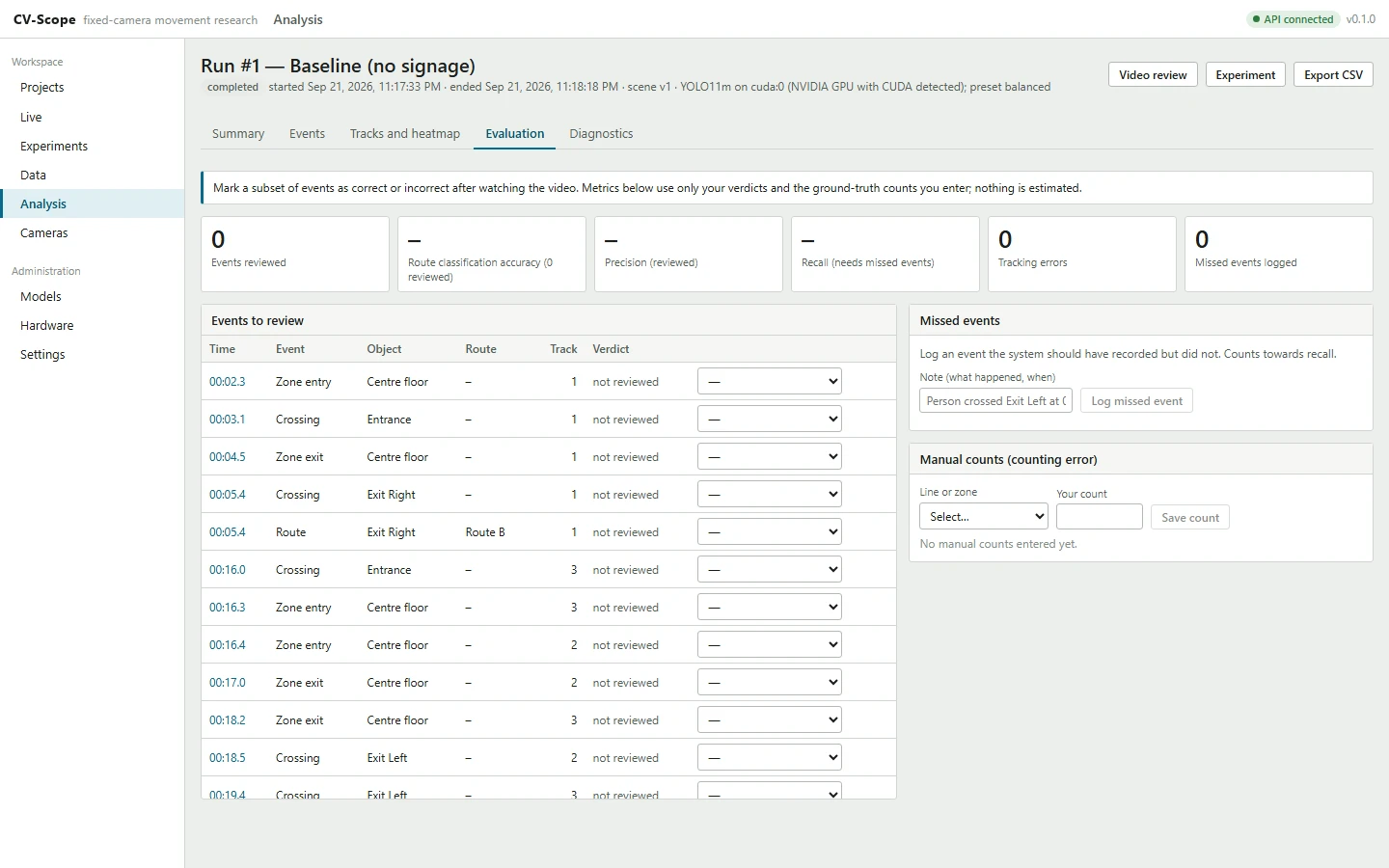
The video review draws the scene and the stored trajectories over the recording, with a marker for every event. In the evaluation tab you mark events as correct, incorrect, wrong route, wrong class or tracking error, log the events the run missed, and enter your own counts.
Precision, recall and counting error are computed from those verdicts alone. Accuracy figures elsewhere are either the detectors’ published reference values, shown for comparison, or measurements from your own benchmark.
Frame widths or metres
Without calibration, distances and speeds are measured in frame widths, and the application says so. With four or more reference points on the ground and their real coordinates, CV-Scope computes a full perspective mapping; with one line of known length, a scale-only estimate. The inspector states which one a scene has.
Relationship rules that need metres do not run on an uncalibrated camera unless they also give a distance in frame widths, and every relationship records which measurement it used.
Beyond counting: relationships and confidence
With relationships turned on, CV-Scope links tracks, identities and places into time-bounded facts, such as approached, travelled with or parked in, and correlates them into higher-level events. Each fact carries a confidence built from tracking, calibration, timing, recognition and sensor evidence, and a state.
Across cameras, sightings of the same identity become moves, scored against travel times and the camera topology. See the multi-camera example.
| State | Confidence | Meaning |
|---|---|---|
| Confirmed by rule | >= 0.85 | the rule's conditions were met with strong evidence |
| Likely | >= 0.65 | default minimum for actions and identity projection |
| Possible | >= 0.40 | shown, filterable, never acted on by default |
| Insufficient evidence | < 0.40 | kept for review only |
From docs/relationships.md.
What stays on your computer
The defaults of every installation, from the privacy documentation. The Settings page of the application shows the same list for its current configuration.
| Data | Stored | Detail |
|---|---|---|
| Anonymous track ids | yes | Integers assigned by the tracker for one run; they restart at 1 for every run and cannot be linked across runs or cameras |
| Events | yes | Crossings, zone entries/exits, dwell and route outcomes with timestamps, object class, duration, speed and confidence |
| Track summaries | yes | Lifetime, path length, mean speed, final state per anonymous track |
| Sampled trajectories | yes (configurable) | Normalized ground-plane positions, up to 10 per second, used for review overlays and heatmaps |
| Uploaded source video | yes (configurable) | Kept in the data directory for review; never transmitted anywhere |
| Live camera video | no, unless an experiment records it | Frames are processed in memory and discarded. JPEG previews are streamed to the browser while a run or a live view is open, and are not stored. An experiment can turn on video recording (below) |
| Raw frames or crops | no | |
| Appearance summaries (BoT-SORT, optional) | no | When appearance matching is switched on, a short numeric summary of each object's appearance is held in memory only while it is tracked, to keep its anonymous id through occlusions within the run. Never written to disk, never compared across runs or cameras, discarded when the track ends |
| Faces, identities, cross-run re-identification | no | Not part of the open-source core. The licensed recognition modules (below) can match deliberately enrolled identities and registered plates; without a licence they are locked and the row stays "no" |
Privacy and research data, including video recording, the licensed modules and relationship data.