Step 1: Connect a camera or a video
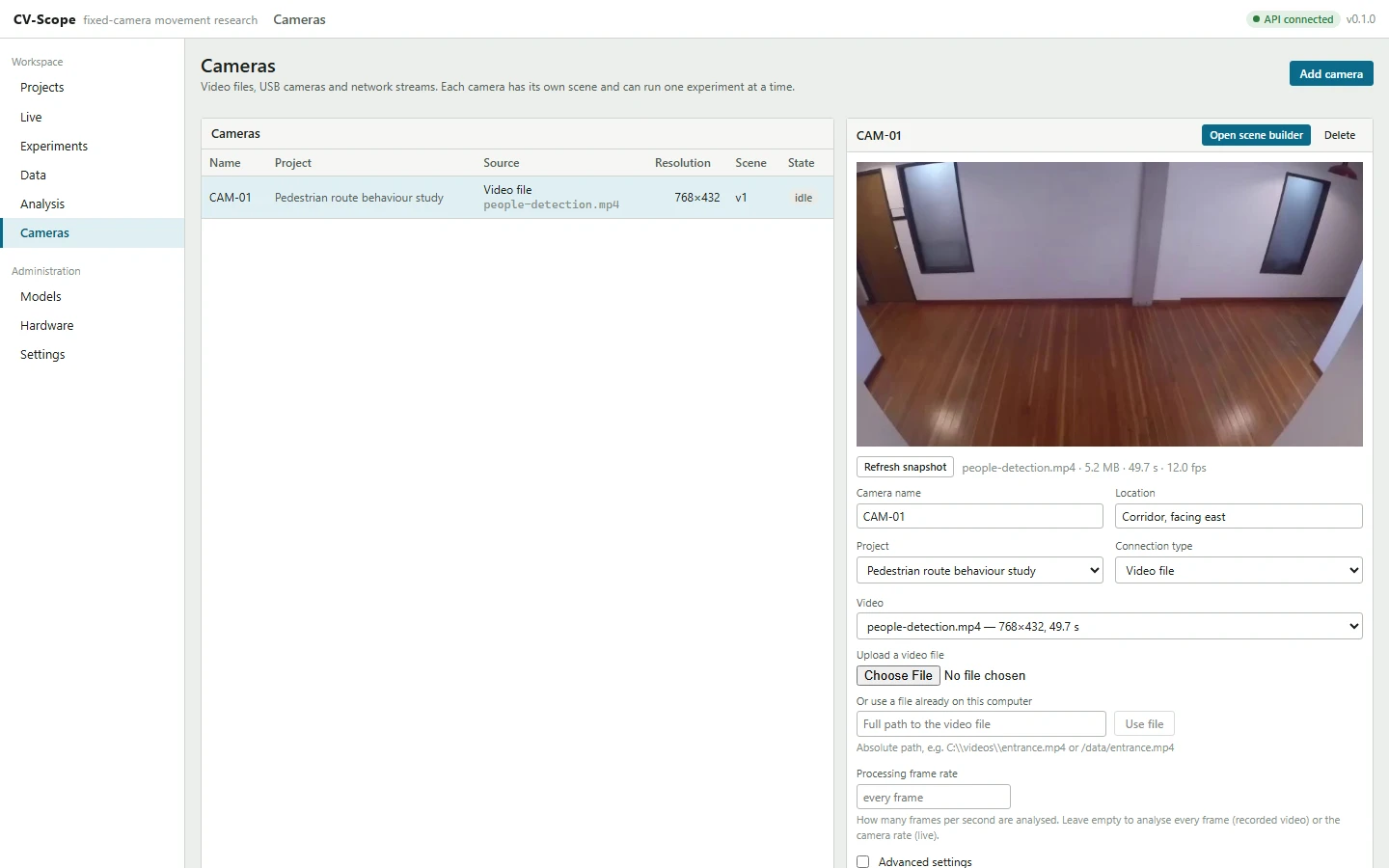
Add a video file, a USB webcam or an RTSP or HTTP stream, with a connection test, rotation, crop and reconnection per camera. On first launch a setup wizard checks the machine and recommends a detector.
CV-Scope is open-source software for studies with fixed cameras. You draw gates, zones and routes over the picture; it tracks people and vehicles anonymously and records every crossing, visit and route choice as data you can check against the video and export.
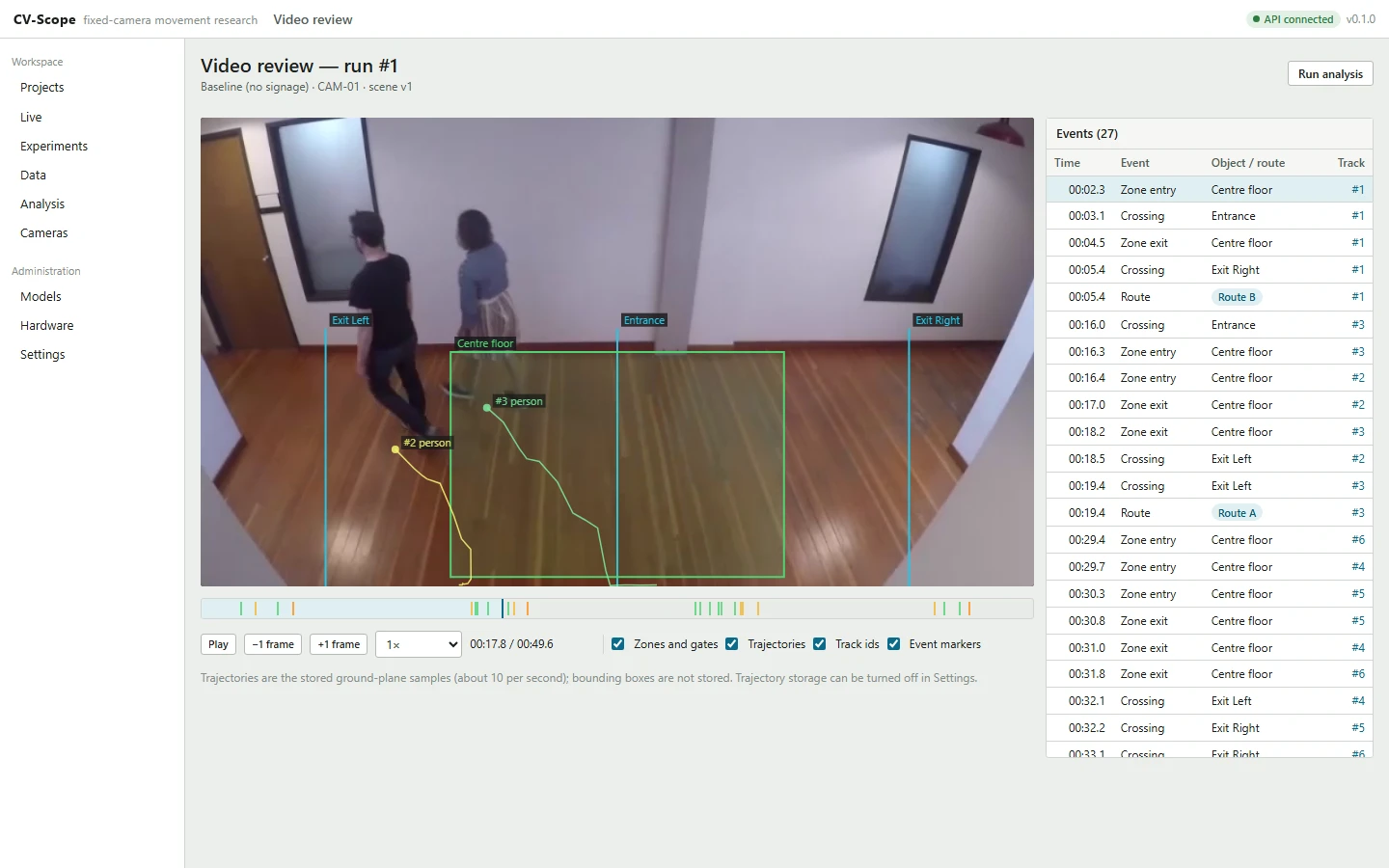
Switch the video off to see only what the run stored.
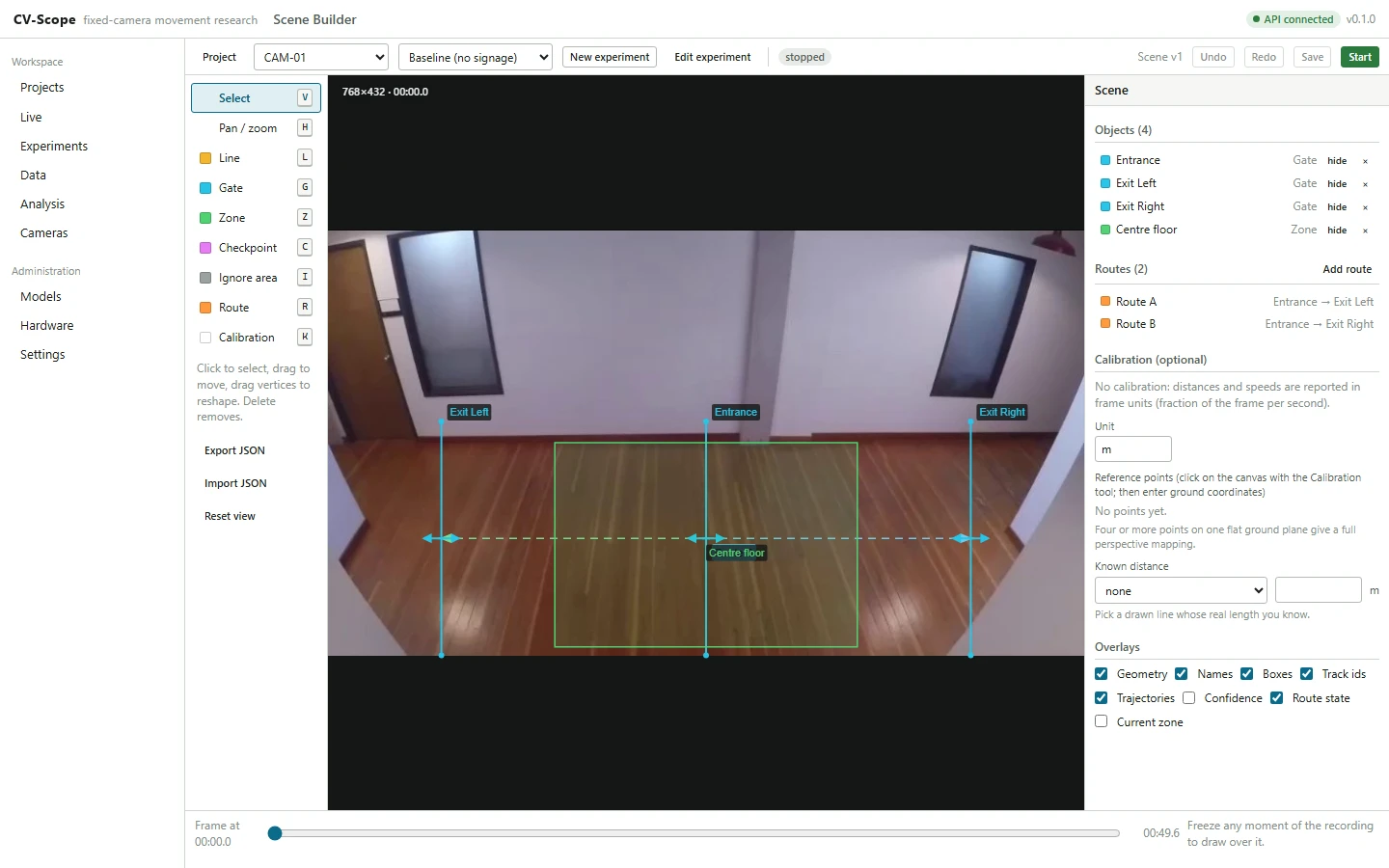
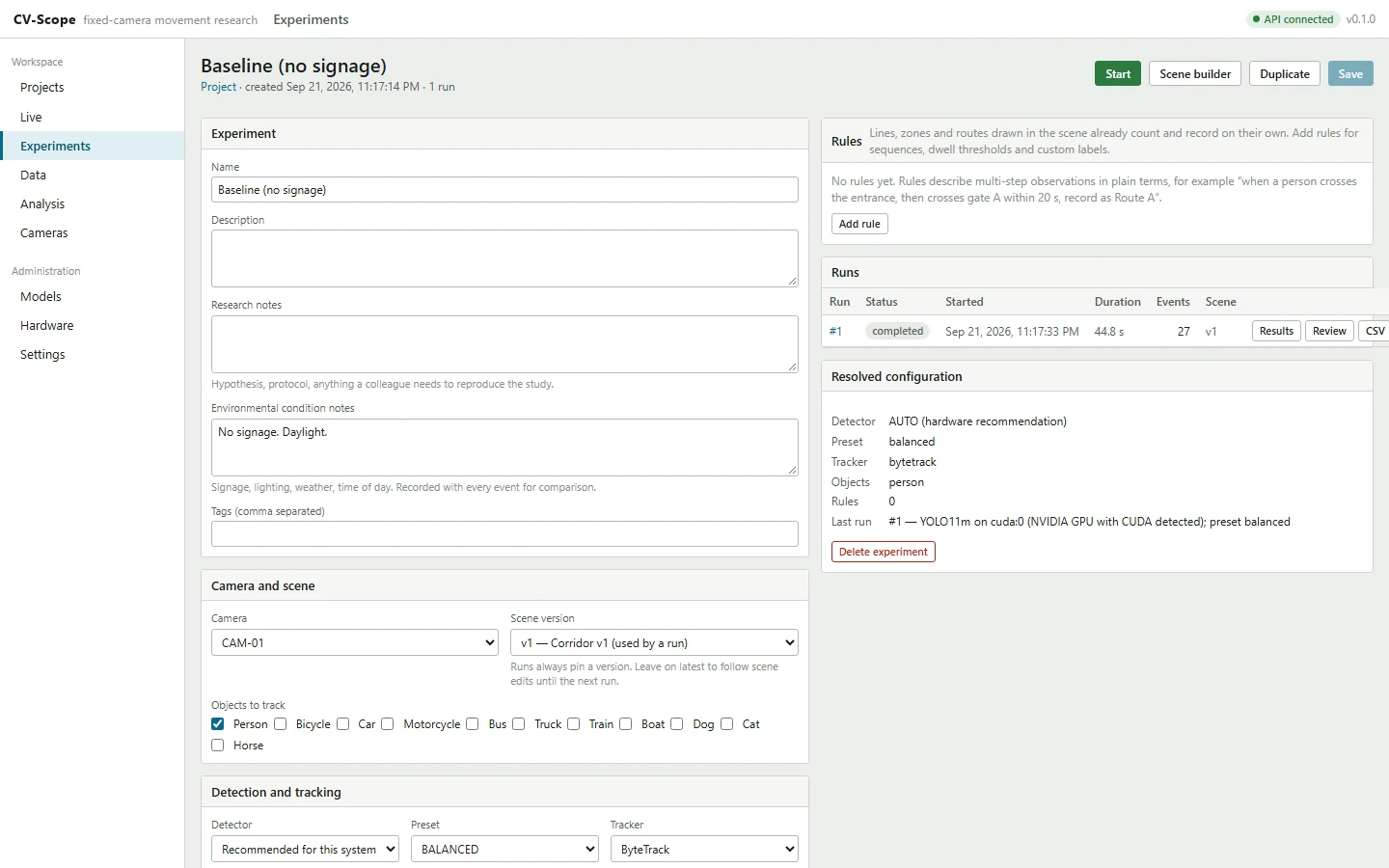
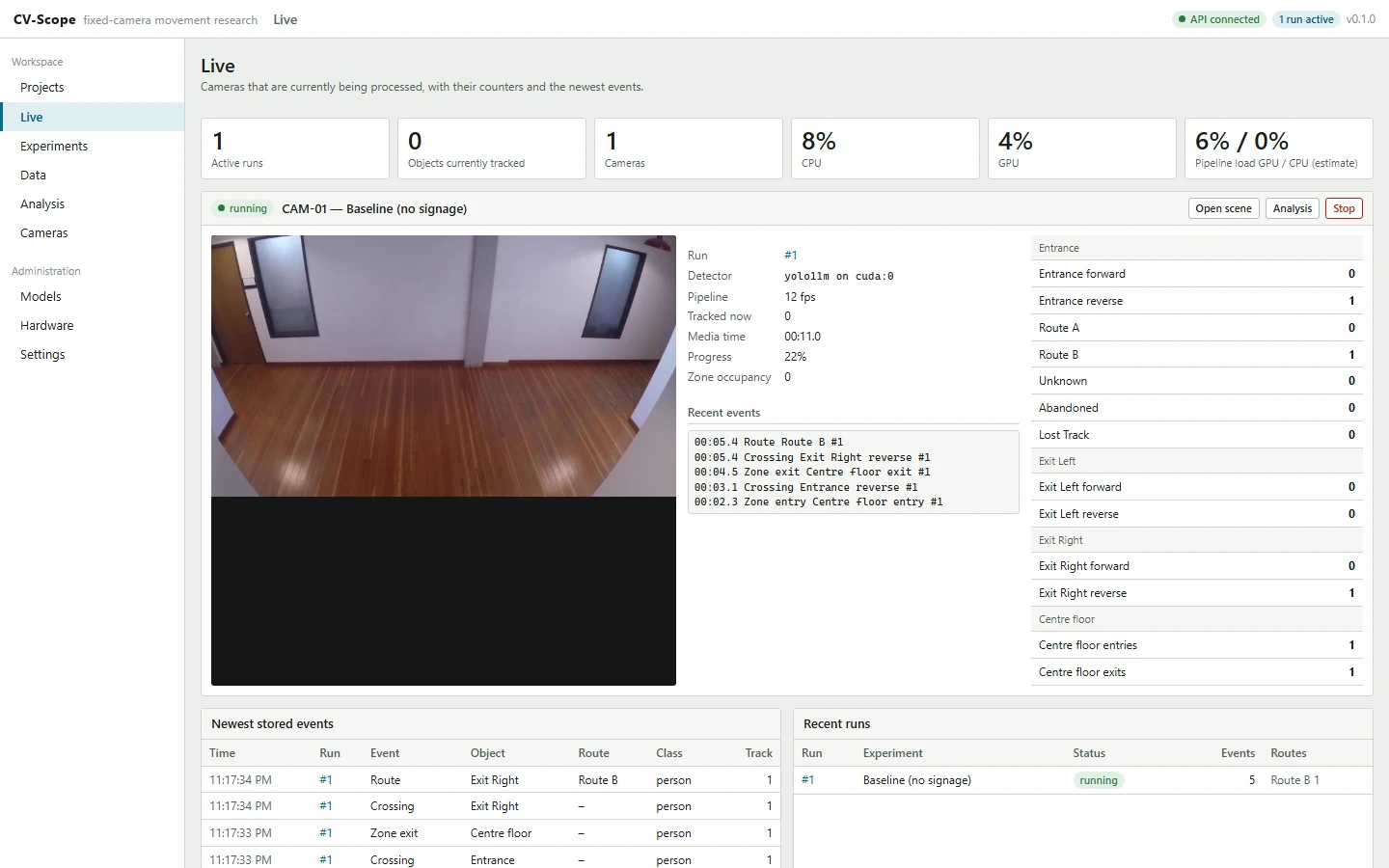
Every step is a page of the application. The screenshots come from the repository and show the same corridor study as the replay above.
Add a video file, a USB webcam or an RTSP or HTTP stream, with a connection test, rotation, crop and reconnection per camera. On first launch a setup wizard checks the machine and recommends a detector.
Put lines, gates, zones, routes, checkpoints, ignore areas and calibration points directly on the frame. Geometry is stored relative to the frame, and a scene version that a run has used is frozen, so earlier results keep their exact geometry.
An experiment fixes the scene version, the objects to track, the detector, the tracker and the rules, with research and condition notes. Rules read like “when a person crosses Entrance, then crosses Exit Left within 20 s, record it as Route A”.
Each camera runs in its own worker process. Tracks, counters and events reach the browser over a WebSocket while the run is in progress; a recorded video is processed as fast as the machine allows.
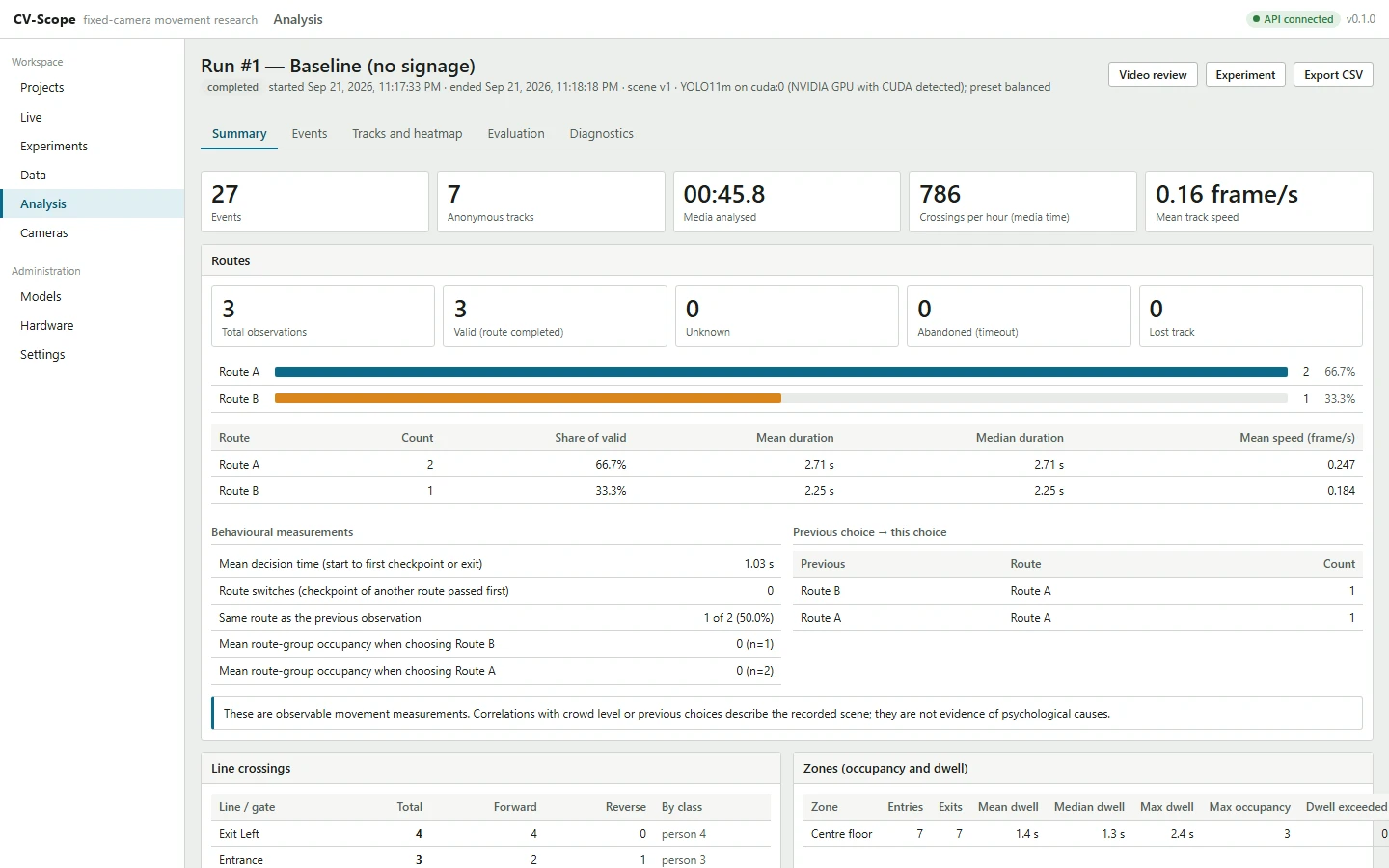
Route shares and decision times, crossings by direction and class, zone visits and occupancy, time series, heatmaps, and experiments compared side by side. The analysis pages describe observed movement and say so.
Replay the run with its geometry and trajectories over the video. Mark events correct or wrong, log the ones it missed and enter manual counts: precision, recall and counting error come only from those verdicts.
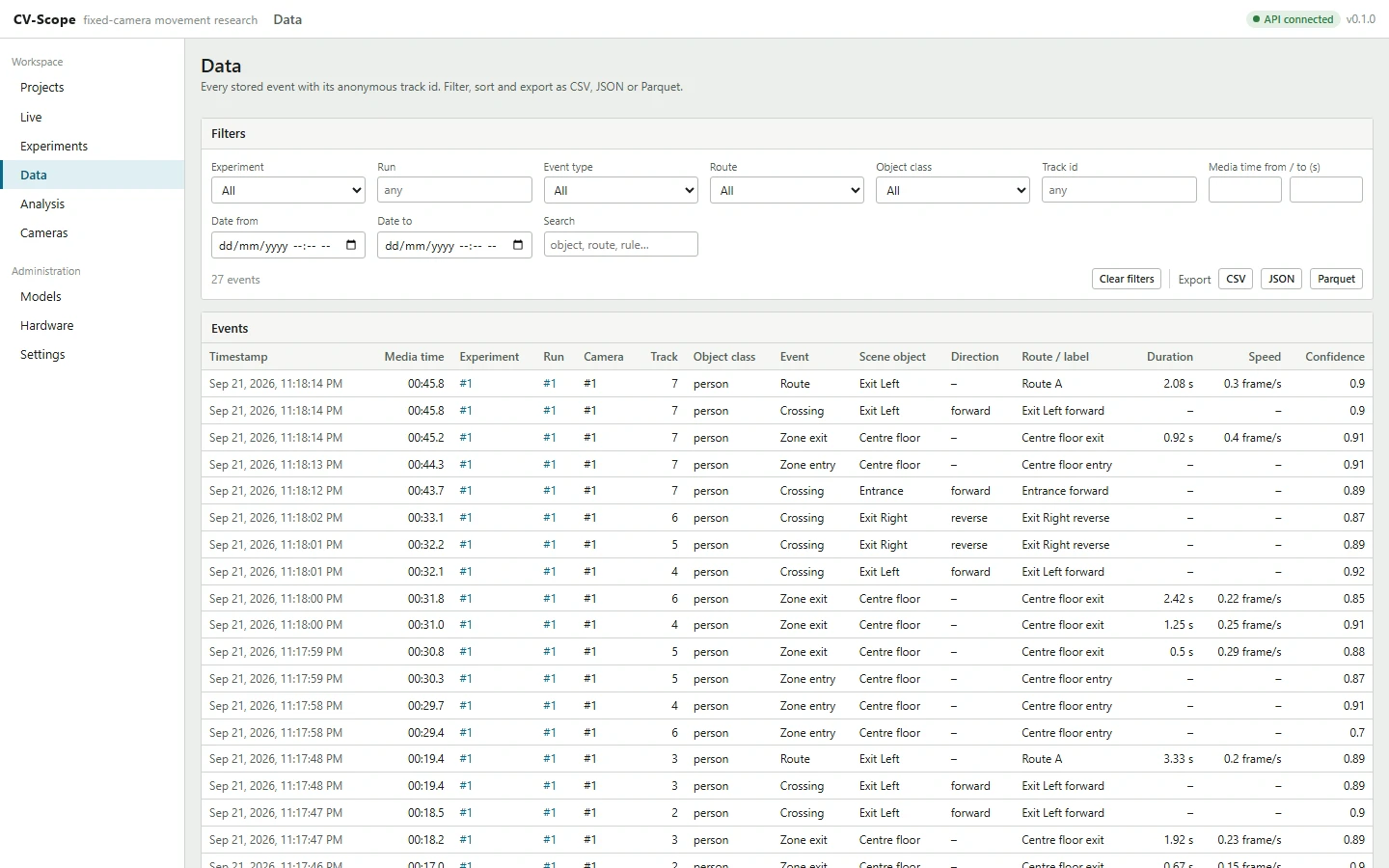
Filter every stored event and export it as CSV, JSON or Parquet, or send events to other systems as they happen, through webhooks and the REST API.
Each example is drawn from a real run on public footage, with the scene and settings from the guides. The detector that produced it is named, so you can repeat the run and compare.
Route choice
An entrance gate, two exit gates and two routes over a corridor. Every person who passes the entrance is recorded as one route, or as Unknown, Abandoned or Lost track.
3 people passed the entrance gate; 3 completed a route, with a mean decision time of 1.03 s.
Counting by class
Two lines over a car park seen from above, tracking three classes at once. A cyclist counts as a person and as a bicycle, and the guide explains how to count them apart.
West edge 3 crossings
East edge 5 crossings
Occupancy and dwell
A zone over the corridor floor records entries, exits, visit lengths and how many people were inside at every moment.
Centre floor: 7 completed visits, the longest 2.4 s, mean 1.4 s; at most 3 people inside at once; occupied for 7.4 s of the 49.7 s clip.
Across cameras
Eight synchronised cameras of the public MEVA dataset around a school building, placed on a site plan, with sightings joined into journeys and every move scored.
Grouped by the question you are asking. Each line is implemented in the current source; the links go to the documentation and to guides you can follow with the sample videos.
A canvas editor over the camera picture instead of code.
Detection and tracking turned into crossings, visits and routes.
Rules and relationships built from menus, with the evidence kept.
Cameras placed in a location model, sightings joined into journeys.
Numbers come from your machine, your footage or your verdicts.
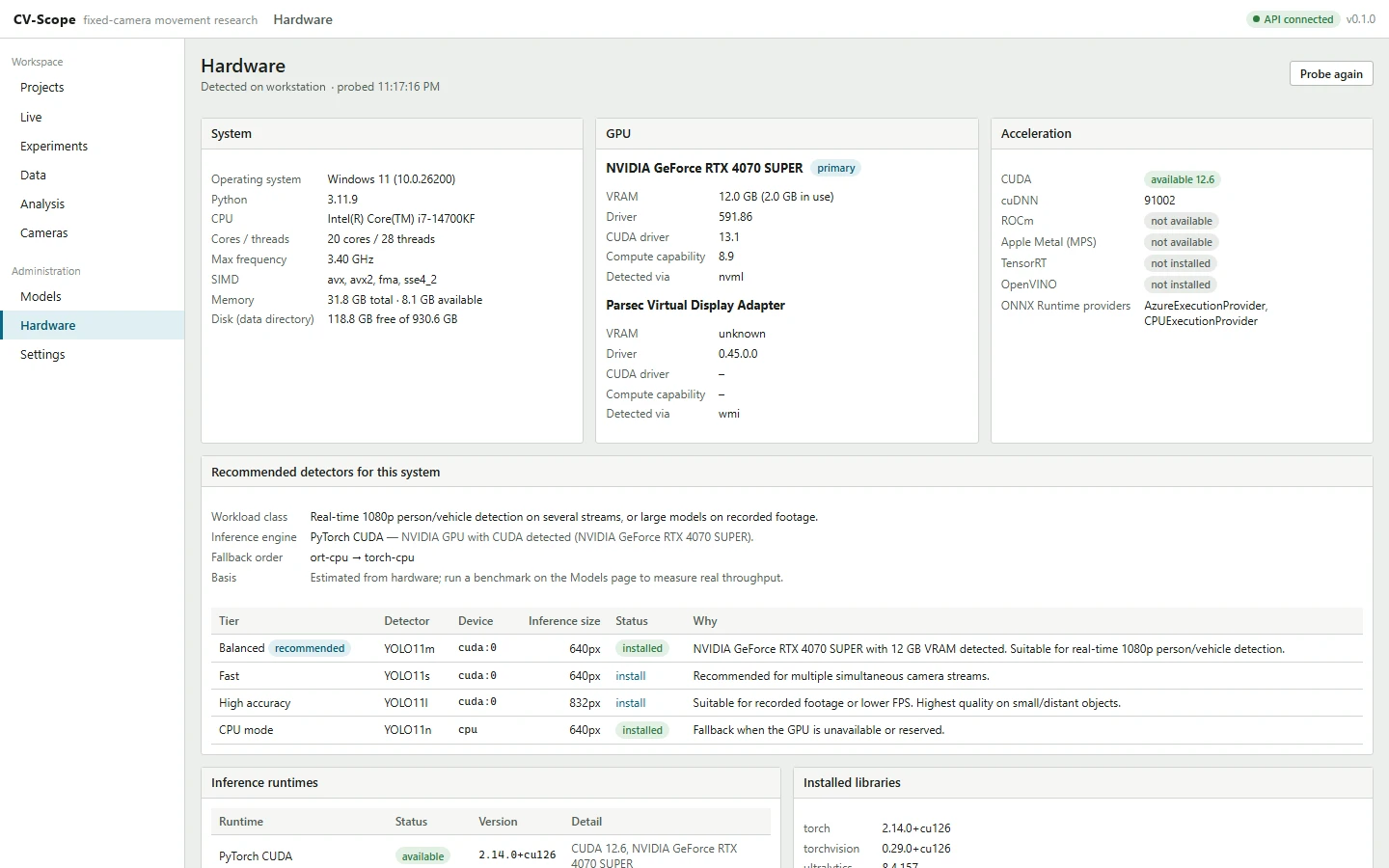
CPU-only machines work; an NVIDIA GPU makes it faster.
Every result is a stored event you can filter, replay and export.
An API-first backend with small, documented interfaces.
Core, optional model
Learns the normal picture of a room, stall or vault and reports objects that appear, disappear or move, presence where an area should be empty, and a covered camera. Computer vision decides; a vision language model (local or a cloud provider you choose) may describe or confirm.
Licensed
Face recognition of deliberately enrolled people and vehicle-plate reading, locked unless a signed licence is installed. Encrypted templates, roles and an audit trail; ordinary events carry only opaque ids.
Off by default
An experiment can keep clips around events, one clip per visit, or the whole run of a live camera, with retention in days and optional overlays.
A result in CV-Scope has one of four origins, and the interface keeps them apart. A researcher should always be able to say which one produced a figure.
Every run
Detector, tracker, your scene geometry and the rule engine
Each count is a stored event: an anonymous track, a media time and the scene object or rule that produced it. The spatial and rule engines apply your geometry and rules the same way every time, and the video review shows each event where it happened.
When you review a run
Your verdicts on events, the missed events you log, your manual counts
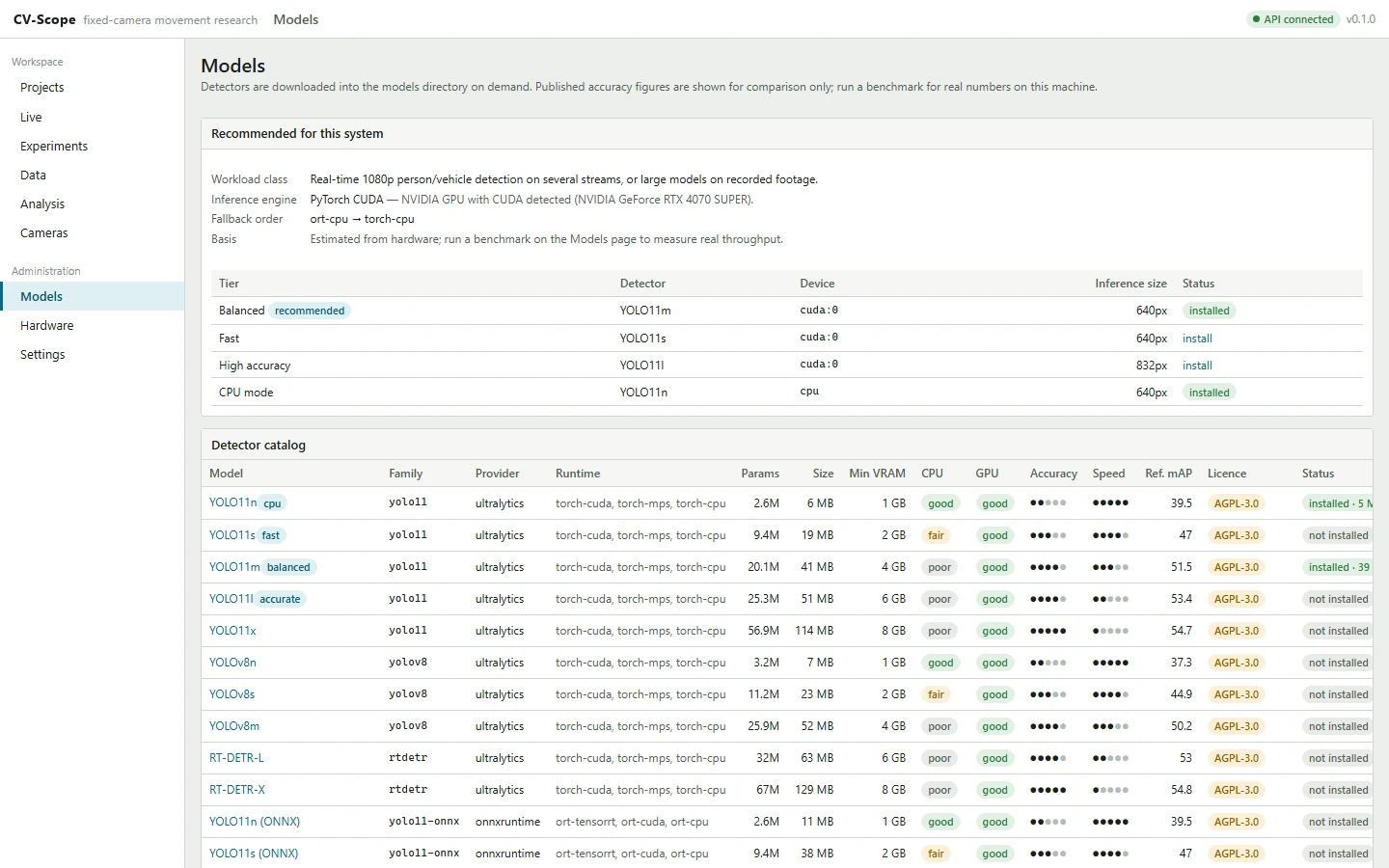
Precision, recall and counting error are computed only from those verdicts. CV-Scope does not estimate accuracy; catalogue mAP values are the upstream projects’ published figures, shown for comparison.
Optional
A vision language model, local or from a provider you choose
In the Anomaly Assistant a model can describe what computer vision found, or confirm it before it is raised in zones set that way. It finds nothing by itself, never creates a relationship or a number, and receives aliases, never names.
Licensed, locked by default
Face recognition of enrolled people, plate reading
Only with a signed licence. Ordinary events keep an opaque id; names and plates stay in separate, access-controlled tables. An identity entered by a reviewer is labelled as a manual annotation, never as recognition.
What is stored, and for how long How the licensed modules are locked The Anomaly Assistant and its model providers
Detection is one stage of seven. The value is in what happens after it: anonymous tracking, your geometry, a rule engine that never guesses a route, and data that analysis can only read. Switch to the engineering view to see the modules and process boundaries.
A video file, USB webcam, or RTSP or HTTP stream.
A detector finds people, vehicles and other objects in each frame.
Detections become anonymous tracks that restart with every run.
Lines, gates, zones and routes turn movement into interactions.
Crossings, visits, dwell, routes and sequences are decided per track.
One stored record per observation, with its track, time and rule.
Summaries, video review, evaluation, exports and the API.
Frame source
vision/sources/Files, USB cameras and RTSP or HTTP streams behind a FrameSource interface, with reconnection.
Knows nothing about detection.
Preprocessing
vision/preprocessing.pyRotation, crop, preview resizing and JPEG encoding for the browser.
Detector
vision/detectors/Ultralytics, ONNX Runtime or torchvision provider, chosen with the hardware probe and a recorded fallback chain (vision/inference/).
Knows nothing about lines, zones or routes.
Tracker
vision/trackers/ByteTrack or BoT-SORT: anonymous, session-scoped ids in tentative, tracked, lost and removed states.
Entity resolver Licensed
recognition/runtime.pyOnly with a licence: says whether a track is an enrolled person or a registered plate. The core sees an interface, never recognition code.
Spatial engine
spatial/engine.pyGeometry only: crossings with direction, zone presence and dwell, sampled ground points, calibrated distances.
Does not decide what an interaction means.
Rule engine
rules/engine.pyPer-track state machines for lines, zones, route groups, sequences and dwell rules. A track without complete evidence is never forced into a route.
Relationship engine Optional
relationships/engine.pyObservations, time-bounded relationships and correlated events, each with a confidence and its evidence.
Imports no detector, tracker or recognition model.
Supervisor and storage
storage/writer.pyDrains the worker queues and writes events, track summaries and trajectories in batches to SQLite or PostgreSQL; restarts crashed live workers.
Cross-camera correlation Optional
crosscam/Joins identity sightings on different cameras into scored transitions, on a background thread.
Analytics and interfaces
analytics/Analytics only read stored rows. The REST API, WebSockets, webhooks and the cvscope command line sit on top.
Never re-runs detection to answer a question.
Paths are relative to backend/pathscope/ and link to the synced commit. A GPU or decoder crash stays inside its worker process; the API keeps running.
On first launch CV-Scope inspects the CPU, memory, GPU and inference runtimes and recommends detectors for that machine. The recommendation is labelled an estimate until you benchmark on your own footage.
| Detector | Device | Detector time per frame, median | p95 | Tracker |
|---|---|---|---|---|
| YOLO11n | GPU (RTX 4070 SUPER) | 10.1 ms | 0.11 ms | |
| YOLO11m | GPU (RTX 4070 SUPER) | 10.4 ms | 0.08 ms | |
| YOLO11n | CPU (Intel i7-14700KF) | 27.2 ms | 0.11 ms | |
| YOLO11m | CPU (Intel i7-14700KF) | 101.3 ms | 0.11 ms |
cvscope benchmark <model> --device <device> --video samples/videos/people-detection.mp4 on 29 September 2026: Windows 11, Intel(R) Core(TM) i7-14700KF (20 cores / 28 threads),
31.8 GB, NVIDIA GeForce RTX 4070 SUPER (12.0 GB). 120 frames of the corridor sample at
640 px, ByteTrack. One machine, one clip: run the same command on yours before choosing a detector.
The code, the documentation and the guides are public. The documentation on this site is rendered from the repository at commit eaf904a, committed 30 September 2026.
Every pull request passes a repository guard, the backend tests, the frontend checks and a dependency review, then a code owner’s review.
The latest release is CV-Scope v0.1.0. Or run from the repository:
                git clone https://github.com/ajm2004/CV-Scope.git


                cd CV-Scope


                bash scripts/setup.sh
                # .venv, PyTorch, frontend, database, samples

                bash scripts/dev.sh
                # API and interface
Needs Python 3.11 or newer and Node 20 or newer; an NVIDIA GPU is optional. Then open http://localhost:5173: the first-run wizard checks the machine, recommends a detector and opens the Scene Builder.
                git clone https://github.com/ajm2004/CV-Scope.git


                cd CV-Scope


                powershell -ExecutionPolicy Bypass -File scripts\setup.ps1


                powershell -ExecutionPolicy Bypass -File scripts\dev.ps1
Needs Python 3.11 or newer, Node 20 or newer and Git. Then open http://localhost:5173.
                docker compose up
                # CPU image

                docker compose --profile gpu up cvscope-gpu
                # NVIDIA image; needs the NVIDIA Container Toolkit
Run from a clone of the repository, then open http://localhost:8420. Data lives in the cvscope-data volume.